Elastic Beanstalk is the AWS service that allows you to deploy and run a web application on EC2 instances, including load balancing and auto-scaling, in a fully managed way. This means that as a user, you only have to provide the application code, and Elastic Beanstalk takes care of the deployment and maintenance of the instances running your code.
Deployment policies or deployment types in Elastic Beanstalk describes how new instances of your application will be deployed when rolling out a new version. They are used to described how existing instances should be replaced with new ones. They are important because they dictate what your downtime (if any) will exist when deploying a new version of your application.
Below are the different types of policies.
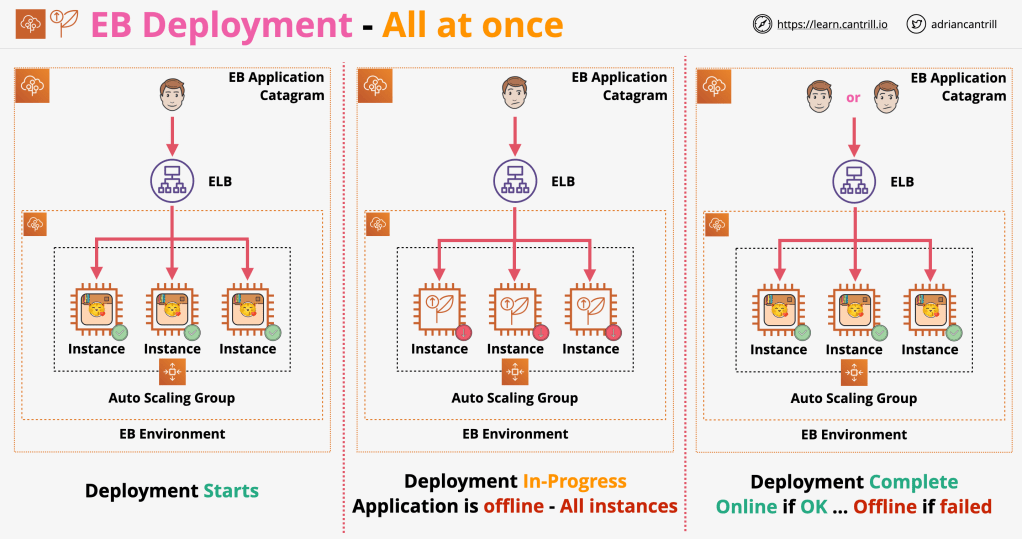
All at once
With this deployment type, the new application version is deployed onto all instances in your EB environment at the same time. This means that all instances in the environment are out of service during the deployment, and service is resumed only when the new deployment finishes successfully.
This is ideal for a development environment because it incurs no additional costs in auxiliary instances, as other policy types do, but not suitable for production environments, because it involves a 100% temporary downtime.
Rolling
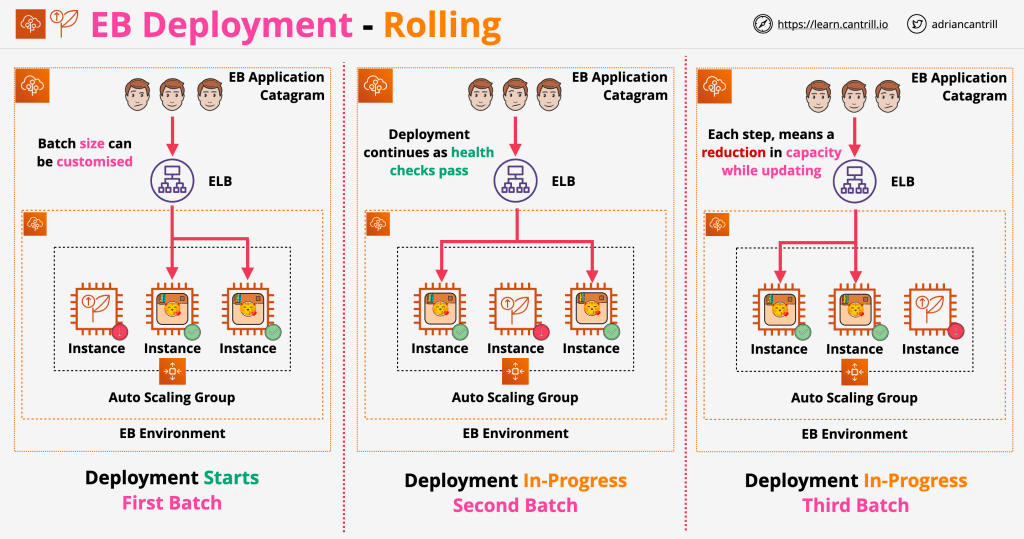
In this deployment policy, you specify a batch size which represents the amount of instances you want to deploy in each batch deployment. Batch size can be expressed as a percentage (i.e., percentage of total number of instances in the auto-scaling group) or fixed (i.e., fixed number of instances.)
Each batch will be unavailable during the deployment of the new version, and once health checks have passed, they will be available to the environment again. This means no extra charges and additional control, because you can explicit how many instances will be deployed to at once; however, it also means a reduction in capacity of whatever batch size you chose.
As an example, if you have an auto-scaling group of 10 instances, and choose a batch size of 5, 5 instances will be taken out of service. They will have the new application deployed to, health-checked, and put back into the auto-scaling group. During that process, the capacity would be reduced by 50%.
In the example below, a batch size of 1 is chosen, and on each step, once instance is taken out of service for deployment.
Rolling with additional batch
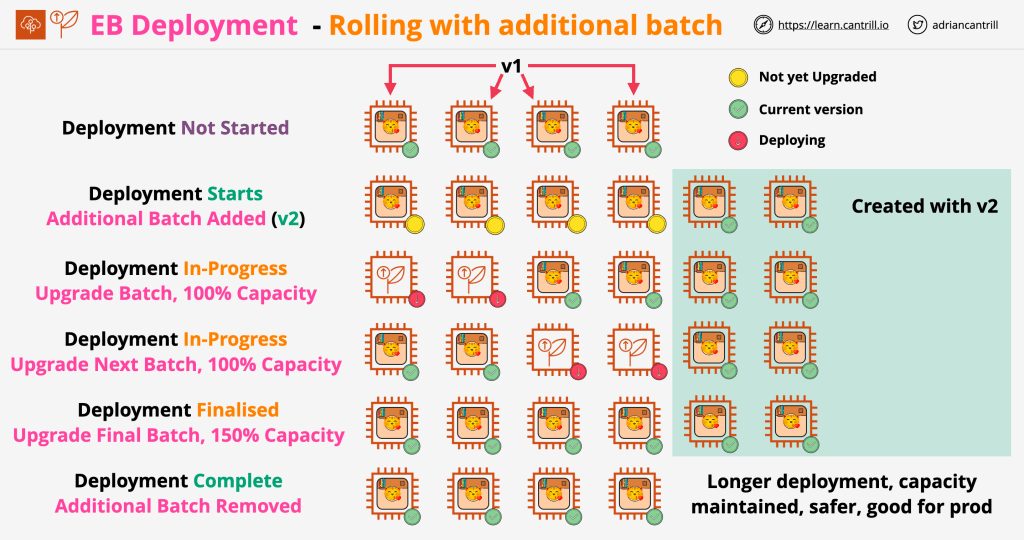
This deployment type is an improvement over the previous one, because it uses the batch size you specified to provision new instances that allows your environment to maintain full capacity during deployment. This means no downtime during deployment, but also means an extra cost for the auxiliary instances being provided.
Given an auto-scaling group of 10 instances, a batch size of 2 would mean that 2 new instances are created, deployed to, and health-checked. If everything went well, 2 instances from the ASG will be replaced with this new ones, and the process will continue until all instances are replaced.
Immutable
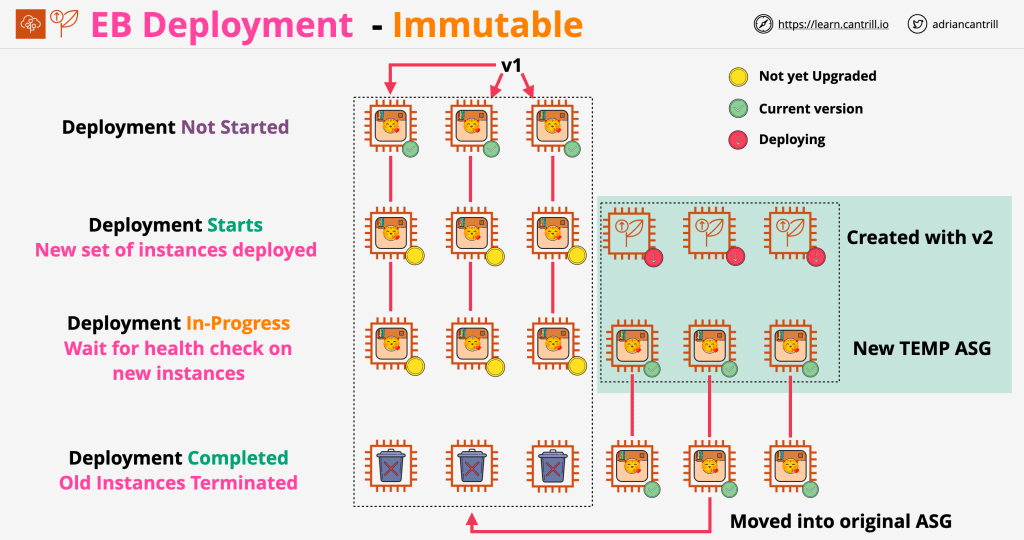
This deployment policy receives its name from the fact that the existing (soon to be old) instances on your environment as treated as immutable. A new auto-scaling group is created with the full number of instances, deployed the new application to, and if health-checks pass, moved to the original ASG.
This means that is the easiest to roll back, because a new auto-scaling group is created altogether with instances running the new version of the application; if health-checks pass, then all instances from the auxiliary auto-scaling group are moved into the original one. It also makes it the costliest option, because an entire secondary auto-scaling group created to deploy the new application version to.
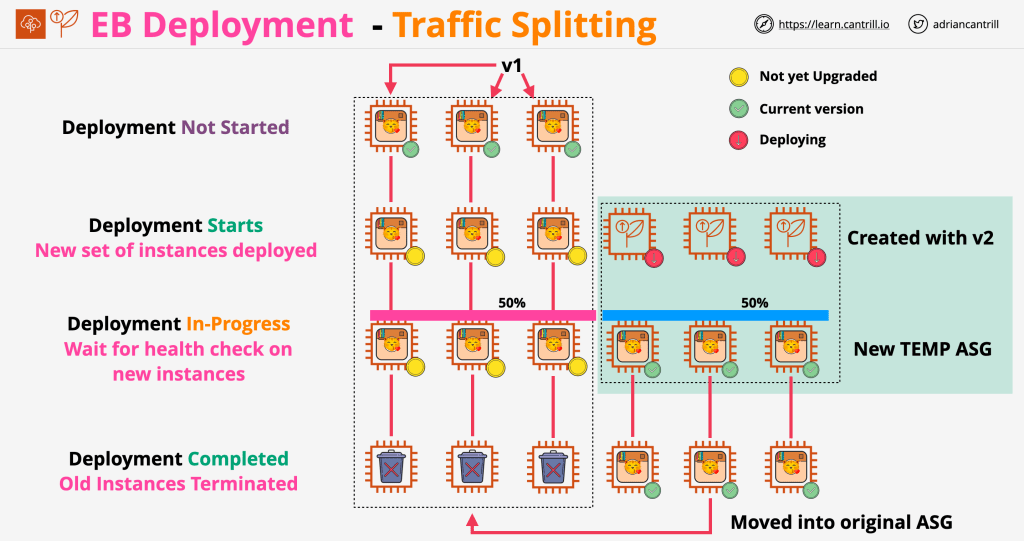
Traffic splitting
Traffic splitting is similar to the immutable deployment type, but with a key difference: it allows you to split traffic between the previous and the new application instances.
When a new auto-scaling group with fresh instances is created with the new application version, traffic can be split between the new and the old ASG for a given amount of time.
The traffic split is specified as a percentage as part of the deployment policy. An evaluation time parameter is also passed; it is used to indicate how much time in minutes (providing health checks pass) Elastic Beanstalk should wait until shifting all traffic to the new ASG.
Blue/Green
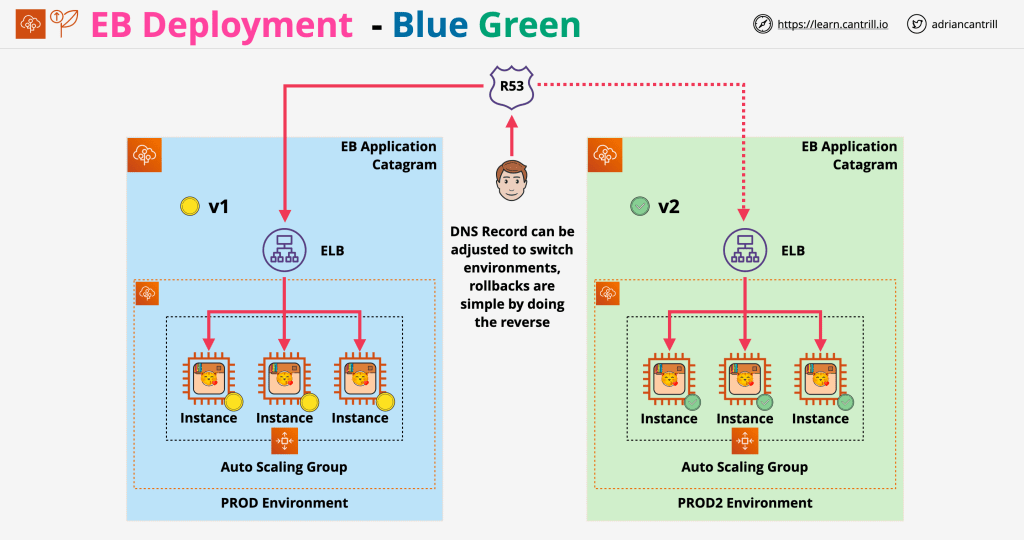
This strategy is similar to traffic splitting, and in fact involves traffic splitting with Route53.
Conceptually, it works exactly as the traffic splitting strategy, with the difference that a whole new EB environment is created, and the original one is only disposed of when you as a user consider it so. In traffic splitting, this was done automatically by EB with the traffic evaluation time parameter.
In this case, you would have to update the DNS record on Route53 once A/B testing is done and you want to route all traffic to your new application version.
Images illustrating the deployments are from Adrian Cantrill’s AWS course, made public by him on his GitHub repository
 Daniel Clas