Introduction
Practicing for AWS DVA-C02 certification I came across a question that had both visibilityTimeOut and waitTimeSeconds parameters as possible anwers. The question read as follows:
In an online store, orders are taken via the web and processed using SQS by a backend, which generates a cost estimation and allows a customer to accept or reject this estimation. You notice customers are occasionally getting 2 costs estimates for the same order. Which of the following could fix the issue?
Within the possible anwers, increasing or decreasing either visiblityTimeOut or waitTimeSeconds were given as options.
I will use this example to explain the difference between the two, how SQS messagges flow and what is short vs. long polling in the context of SQS
Flow of an SQS Message
An SQS message can exist in three possible states:
- Sent to a queue by a producer (in the example above, the backend receives a request to prepare an estimation and immediately offloads this to SQS to be processed in the background)
- Received from the queue by a consumer (a process in the worker tier in the application above might be pulling this queue to generate the estimation on the background, and then possibly notify the frontend that this estimation is finished)
- Deleted from the queue (after a message has been successfully processed by the backend, it is the consumer’s responsibility to delete this message from the queue to avoid it being processed again)
Reading number 3 above might seem counterintuitive at first, at least it did for me. However, reading AWS documentation the reason stated makes perfect sense as to why this would be the case: SQS has no visibility on whether a message that was sent was successfully processed by a consumer, or even reached said consumer.
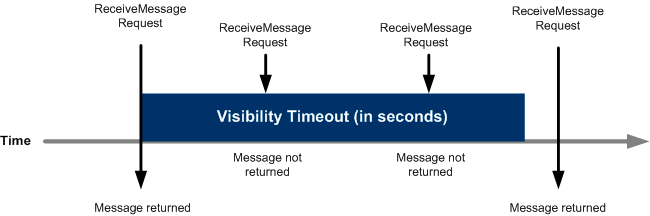
Because of this, what SQS does is to hide a sent message from the queue so that it is not polled again by another consumer for a given interval of time. This interval is the visibility timeout.
Understanding Visibility Timeout
Visibility timeout parameter allows you to specify the length of the interval in which a message will be hidden, i.e. not sent to other consumers or to the same consumer again. After this timeout is expired, if the message in question has not been deleted it will be available to be pulled again.
Default timeout set by SQS is 30 seconds, and can range from 0 to 43,200 (12 hours). This is counted from the moment when the ReceiveMessage action is executed. SQS queues have a general queue timeout, and you can also specify a message’s timeout when receiving it.
If you are working with Node.js, you’ll likely do this when instantiating the consumer.
Long vs. Short Polling
Billing on SQS happens on a per-request basis, meaning that the more frequent polls you perform, the higher the charge and the less cost-effective the service.
Given this, you can configure the seconds parameter mentioned in the question, waitTimeSeconds, to specify the frequency of the polls you will be performing. This can be set at a queue level or when performing a ReceiveMessage action.
Short polling happens when this parameter is set to 0, which means you will keep your queue close in a close to zero length, creating a constant stream of polls.
Long polling occurs when you specify a waitTimeSeconds, which can be set to up to 20 seconds. Unless connection times out, SQS will wait up to the amount of seconds you set this to, gather messages from the topic specified and return them. This makes for a more efficient polling.
Answering the question
Knowing this two parameters exist, we can understand the problem posed in the question.
If the visibility timeout for the queue is set to 10 seconds, but the estimation process from the question (which includes deleting the message from the queue at the end) can take up to 20 seconds, then the possibility exists that the consumer will pull and process the same message twice.
Thus the solution is to first be aware of the length of the process by the backend, and then change the visibility timeout to accommodate your application needs.
 Daniel Clas